

During our recent in-situ at a local elementary school with our tech class, we had the opportunity to explore how technology is being used in today’s classrooms. We had the chance to use the Stop Motion Studio app to help the students create short animated videos. Stop Motion Studio is a user-friendly app that allows users to create animations by capturing a series of still images and stitching them together to form motion. It’s available on tablets and iPads, which are common in many elementary classrooms. The app helps students engage in storytelling, sequencing, and visual literacy while also fostering patience and problem-solving skills. In the school we visited, iPads were readily available for small groups, making it easy for each team to create their own stop motion video.
The week before our visit, we practiced using the app ourselves, learning how to take frame-by-frame photos, move objects slightly between shots, and add sound or text to bring our stories to life.
We first asked the students to brainstorm story ideas to get all of their thoughts down before starting. This was such a hilarious and cute experience. Our group wanted to have every scene from Mexico to Calgary, and the featured characters in their video were their desk pets. Our one little friend had unfortunately misplaced his so we improvised and used a toy car he had in his desk.
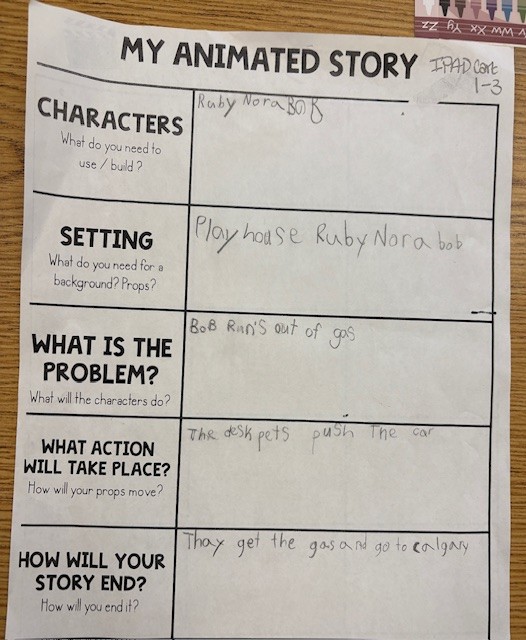
After brainstorming, we moved on to the next step: bringing their creative ideas to life. It was amazing to see how engaged they were! Every student had a role, whether it was positioning the characters, taking the photos, or both. Even our student who used the toy car instead of a desk pet made it work perfectly. This creativity actually inspired others to add props from around the classroom as well. The energy in the room was contagious.

Students helped one another troubleshoot and celebrated each small success together. By the end, they were so proud of their finished videos, and it was clear they had as much fun making them as we did watching their imaginations come to life.
Organizational Structures for Effective Technology Use
- Device Management Systems: Having tablets or iPads assigned to specific classrooms or grade levels helps ensure accountability and ease of access.
- Digital Citizenship Guidelines: Teaching students how to handle technology responsibly, such as saving work properly and respecting shared devices, is key.
- Teacher Collaboration: Providing teachers with professional development and time to collaborate helps them integrate tools like Stop Motion Studio meaningfully into lessons.
- Structured Routines: Simple routines, such as assigning a “tech captain” to ensure the tech used is returned and put back correctly.
With these supports in place, technology becomes a creative tool for learning rather than a distraction.
Then vs. Now: How Classrooms Have Changed
Reflecting on my own elementary school experience, I noticed that classrooms have changed drastically in terms of technology. When I was a student, technology use was limited/non-existent. I went to elementary school in the early 90s, when technology was still only a twinkle in educators’ eyes. It wasn’t until grade 4, I believe, that we had a shared classroom computer. The teacher would use an overhead projector for lessons. I remember a classroom job was cleaning the transparent plastic sheets that the teachers would write on for the projector. Today’s classrooms are dynamic digital spaces. Technology now supports hands-on, inquiry-based learning. Students have access to iPads, interactive whiteboards, online reading platforms, and creative apps like Stop Motion Studio. Using digital tools allows students to explore and express their ideas in ways we could never have imagined as kids.